1Open the Menu on the Calendar page
Go to the Calendar and click Menu in the top bar.

2Direct Booking → Create a new inquiry
In the drop-down, find the Direct Booking column and click Create a new inquiry.
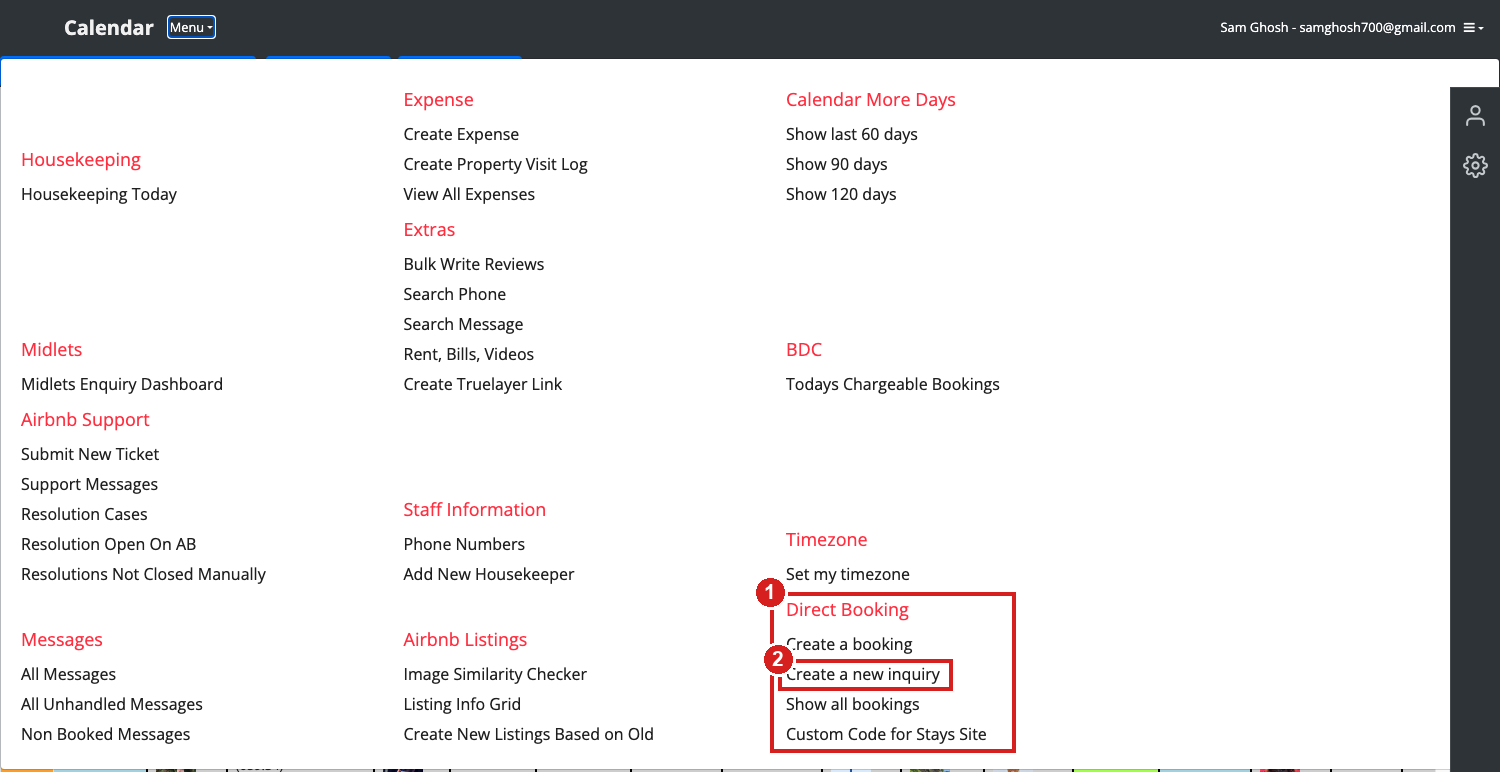
- The Direct Booking column, on the right-hand side of the menu.
- Create a new inquiry — the new link. (Create a booking right above it is the old form, for when you already have an agreed booking on a known flat and known dates.)
3Fill in what you actually know
This form deliberately asks for much less than the booking form. There is no money on it, and the property, the dates and the guest count are all optional — leave them blank if the guest has not told you yet.
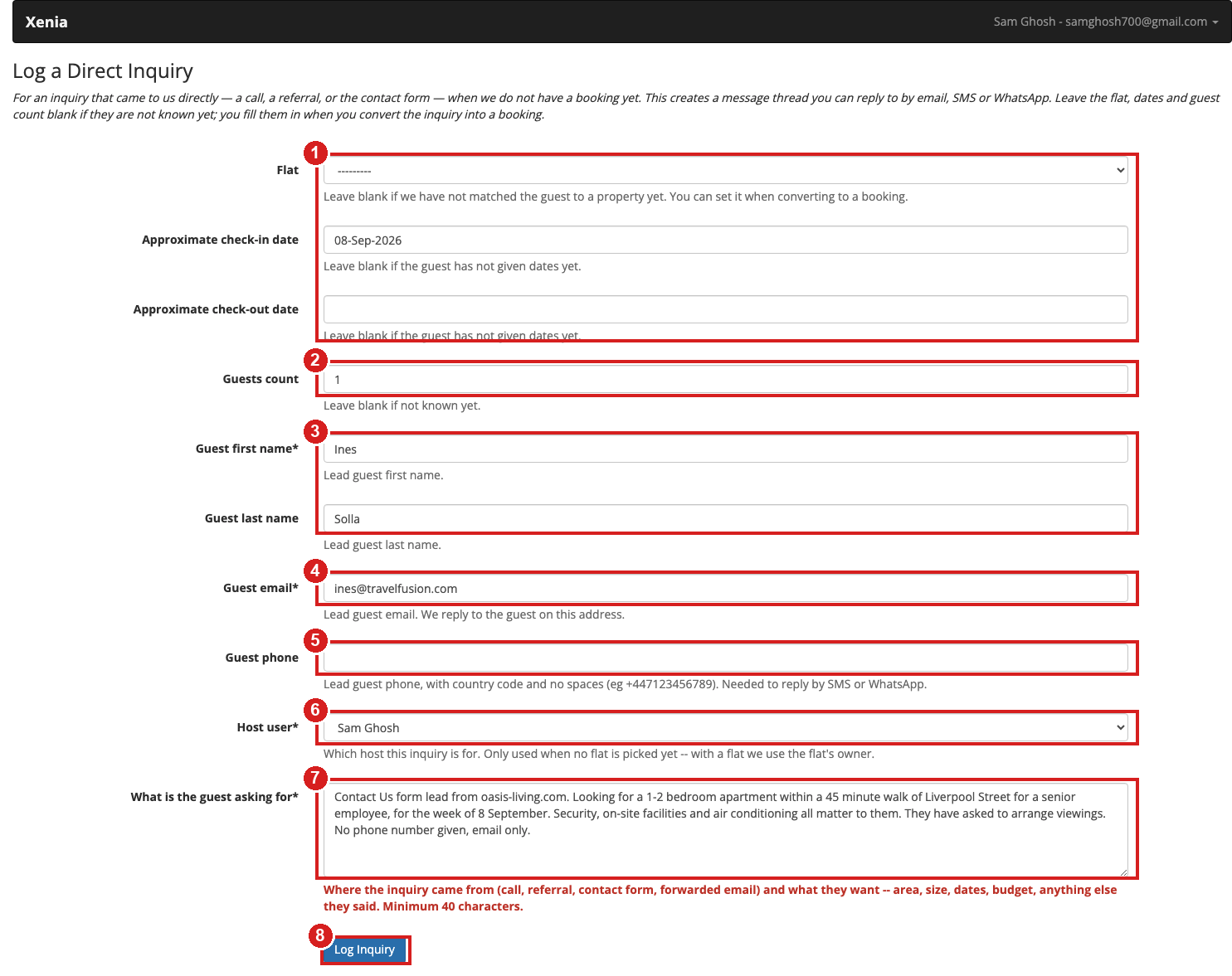
- Flat, check-in, check-out optional Fill in whatever the guest gave you. In this example we had a rough arrival week and nothing else, so only the check-in date is set and check-out is left empty. That is fine.
- Guests count optional Leave blank if not known.
- Guest first / last name — first name is required, surname is not (a phone caller often does not give one).
- Guest email required This is the address we reply to, so get it right. If the inquiry came in by phone, ask for it on the call.
- Guest phone optional With country code and no spaces,
e.g.
+447123456789. You need it here to reply by SMS or WhatsApp — without it, email is your only channel. - Host user — which host the inquiry is for. Defaults to Sam. It is only used while there is no flat; once you pick a flat we use that flat's owner.
- What is the guest asking for required, min 40 characters Where it came from (call, referral, contact form, forwarded email) and what they want — area, size, dates, budget, anything else they said. This is what everyone else reads in Slack and on the thread, so write it properly.
- Log Inquiry — creates the thread and takes you straight to it.
4You land on the inquiry thread
Submitting takes you directly to the thread page. Nothing else to click — you can start talking to the guest from here.
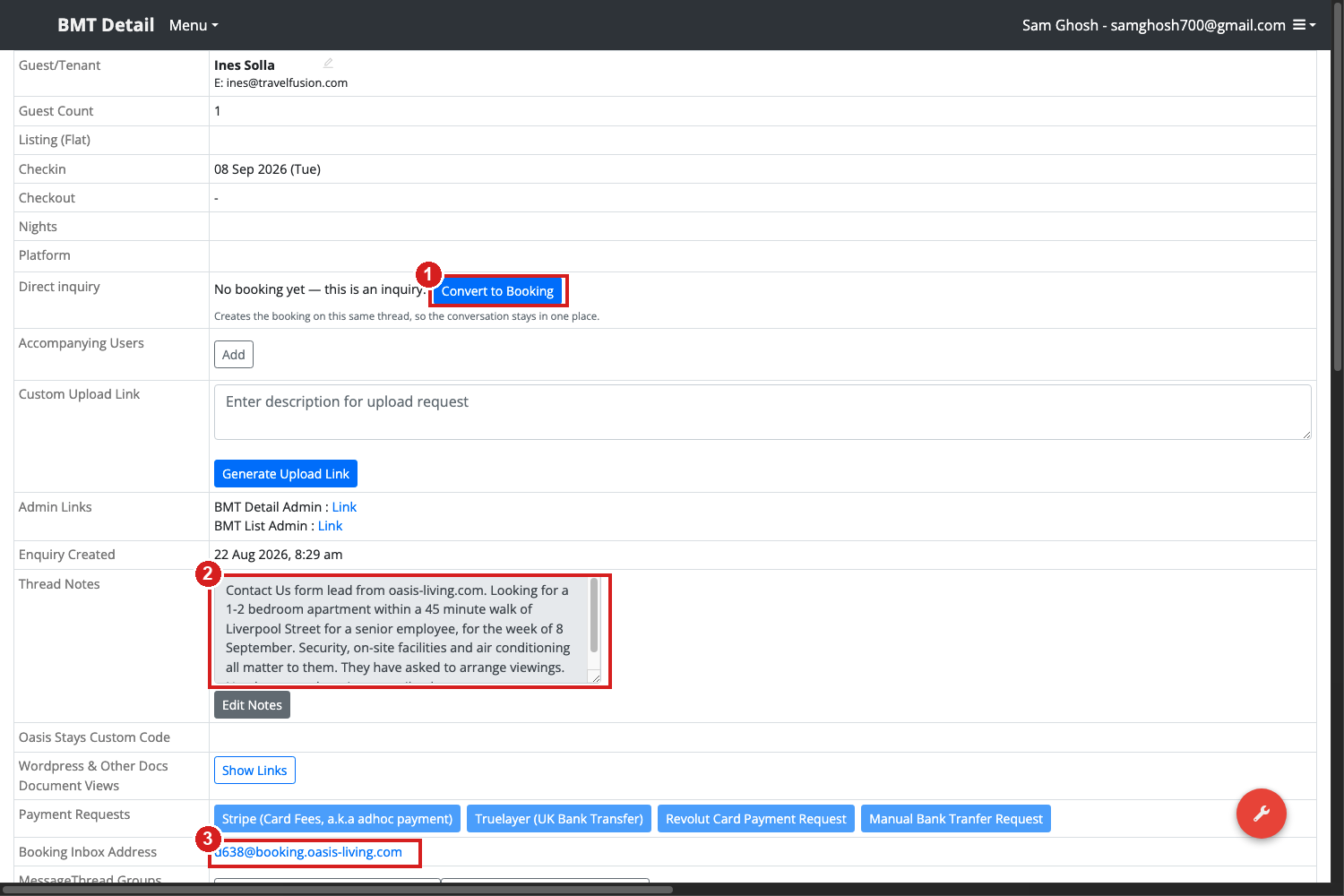
- Direct inquiry — No booking yet. The Convert to Booking button lives here. Leave it alone until you have matched the guest to a flat (see step 6).
- Thread Notes — what you typed into "what is the guest asking for". Edit it as you learn more.
- Booking Inbox Address — this thread's own address, e.g.
d638@booking.oasis-living.com. Anything the guest sends there lands on this thread. It is also the reply-to on emails we send them, so their replies come back here automatically.
Note the Checkout row shows -. An inquiry with no check-out date is perfectly
valid; you only need real dates at the point you convert it into a booking.
5Reply to the guest
Scroll down to Compose — the same box you use on every other thread.
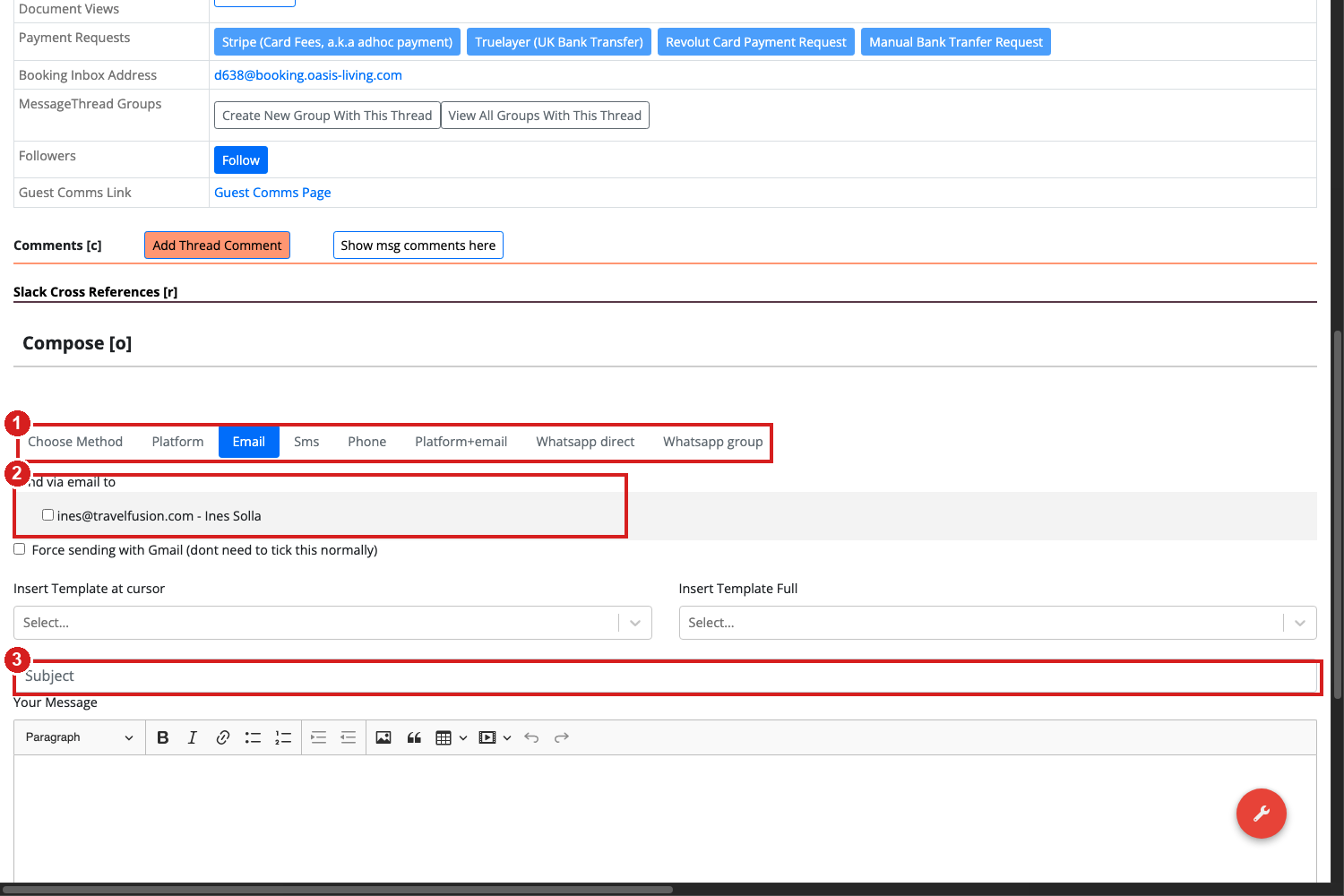
- Choose Method — Email, SMS, Phone or WhatsApp. There is no Platform option on a direct inquiry, because there is no Airbnb or Booking.com inbox behind it. SMS and WhatsApp only work if you entered a phone number.
- Send via email to — the guest's address, already filled in. Tick it and go.
- Subject, then your message underneath.
6Where it shows up in Slack
Everything about a direct inquiry goes to #msg_prebook — both the alert when you create it and any reply the guest sends afterwards.
*===============*
*New Direct Inquiry*
*Guest* - Ines Solla
*Flat* - not decided yet
*Dates* - from 08 Sep 2026
*Guests* - 1
*Asking for* - Contact Us form lead from oasis-living.com. Looking for a
1-2 bedroom apartment within a 45 minute walk of Liverpool Street for a
senior employee, for the week of 8 September. Security, on-site facilities
and air conditioning all matter to them. They have asked to arrange
viewings. No phone number given, email only.
https://xenia.bnbhelper.co/api/v2/core/basemessagethread/47855/
Flat reads "not decided yet" and Dates reads "dates not known yet" when you left those blank — that is expected, not an error. The link at the bottom goes straight to the thread.
Once the inquiry becomes a booking with real dates, it stops being a pre-book item and its messages start routing the normal way — #msg_today, #msg_tomorrow and so on, based on the booking's dates.
7When you find them a flat: convert it
Click Convert to Booking on the thread. This creates the booking on the same thread, so the whole conversation stays in one place — do not use "Create a booking" from the menu for a guest who already has an inquiry thread.

That opens this form, already filled in with everything the inquiry knew:
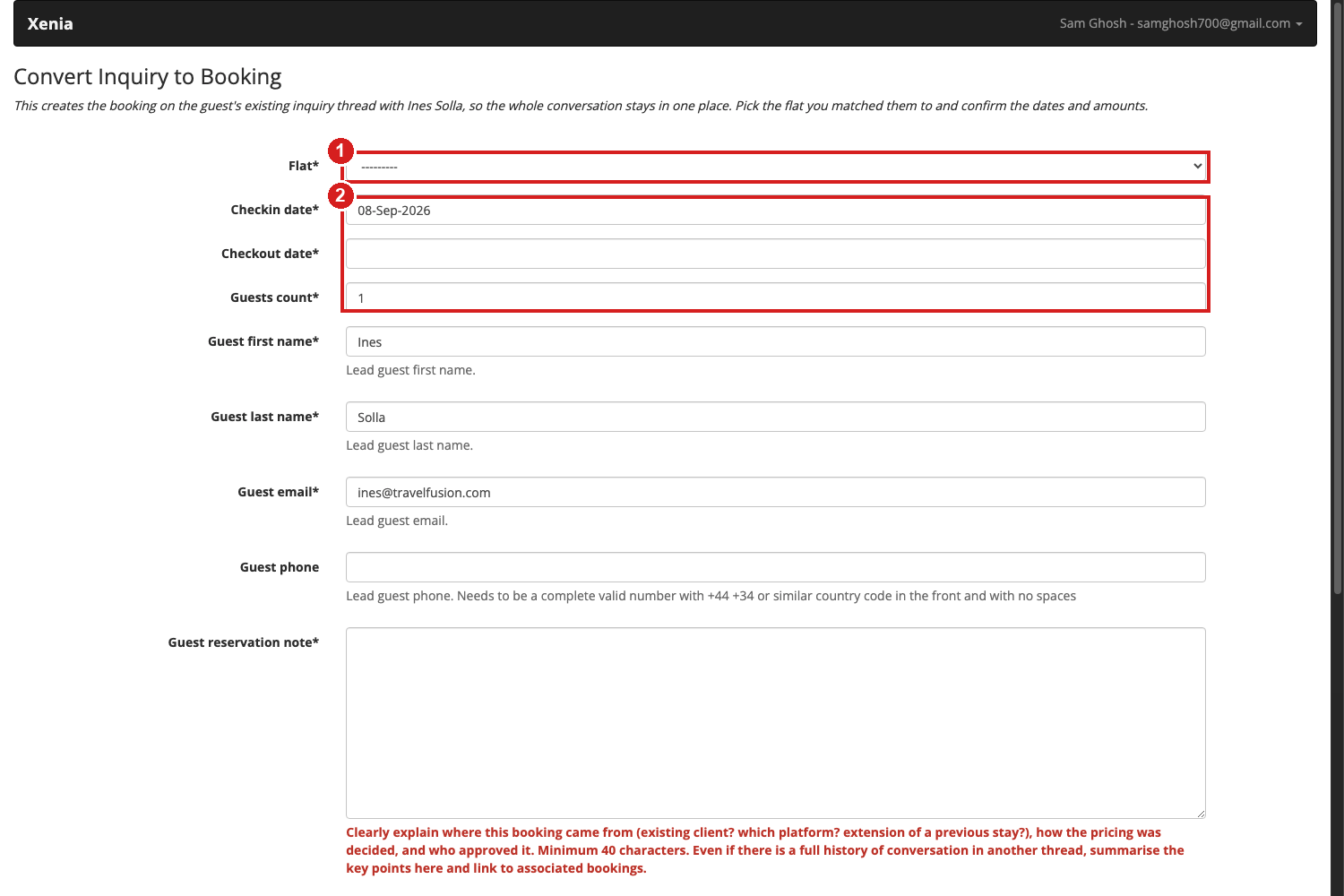
- Flat — the property you matched them to.
- Check-in, check-out and guest count — all required now. Whatever the inquiry had is pre-filled, but a booking needs real, agreed dates, so a blank check-out has to be filled in here.
The rest of the form is the standard direct booking form: guest details (pre-filled from the inquiry), the reservation note, and the amounts. Everything the guest already said to you stays on the thread.
8Quick rules
| Situation | What to do |
|---|---|
| Phone call, referral, or Contact Us lead — no flat or dates agreed | Menu → Direct Booking → Create a new inquiry |
| Booking already agreed, flat and dates known, money known | Menu → Direct Booking → Create a booking (the old form) |
| A guest who enquired earlier is now booking | Open their inquiry thread and click Convert to Booking. Never create a second booking from the menu — that makes a second thread for the same guest. |
| Guest gave no email, only a phone number | Email is required on the form. Ask for it. If you truly cannot get one, speak to Sam. |
| You do not know the dates | Leave them blank. You can add them any time, and you must confirm them at convert time. |
Appendix — how the menu link is configured (tech only)
The menu is driven by globalprefs.CalendarMenuCategory and
CalendarMenuItem in Django admin, at
/admin/globalprefs/calendarmenucategory/. Adding a link needs only a display text, a
relative URL and a sort order — no code deploy.
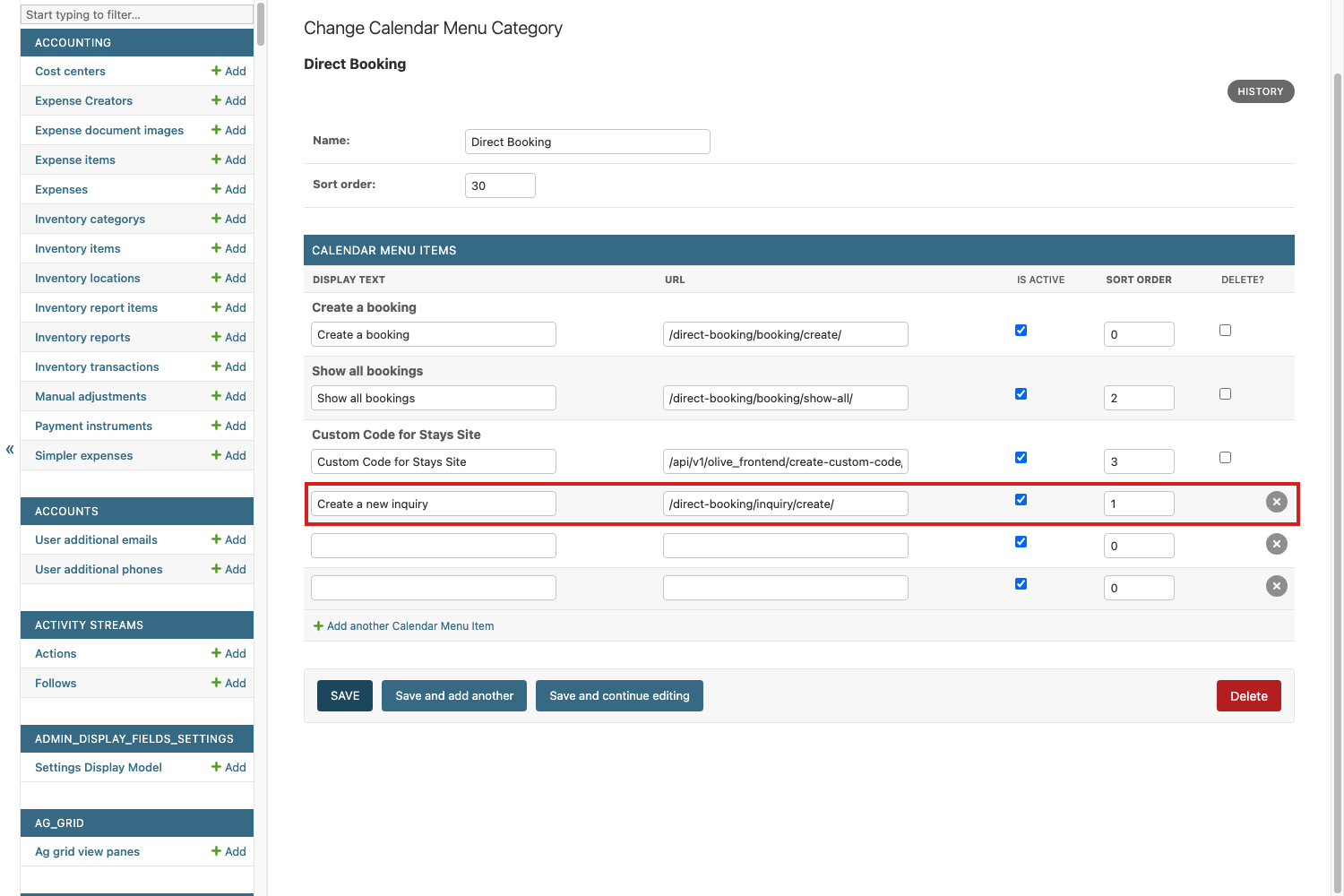
The item added here is Create a new inquiry →
/direct-booking/inquiry/create/, under the Direct Booking category.